
You can make a payment online at any time by logging into your account at Kin.com.
If you pay for your policy using your credit card, we will automatically charge your card on the due date. We also send reminders in advance of the due date to remind you that your card will be charged.
When you might make a payment:
- Your payment was declined and you need to update your card on file
- You want to pay early
- You're escrow pay but need to make a one-time payment to prevent cancellation
- You're escrow pay but need to pay for a policy change (not all lenders will pay for policy changes, see [this article] for more details).
Step-by-step instructions:
- Log into your customer portal at Kin.com
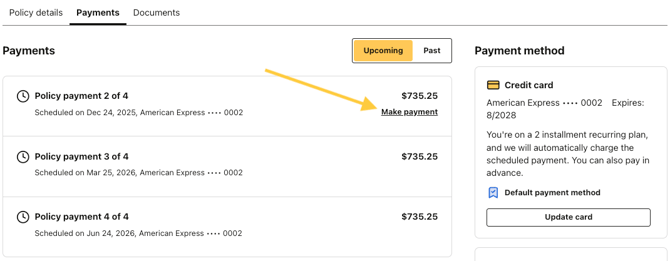
- Navigate to the Payments section of your policy
- Find the payment you want to make in the upcoming transactions list
- Click Make Payment next to the transaction
- A payment modal will appear
- Review the payment amount at the top of the modal
- You can choose to use your card on file or use a different card. If you use a different card, you will need to enter:
- Card number
- Expiration date
- CVV
- Billing zip code
- You can choose to save the different card and replace the existing card if you want to.
- Click Pay
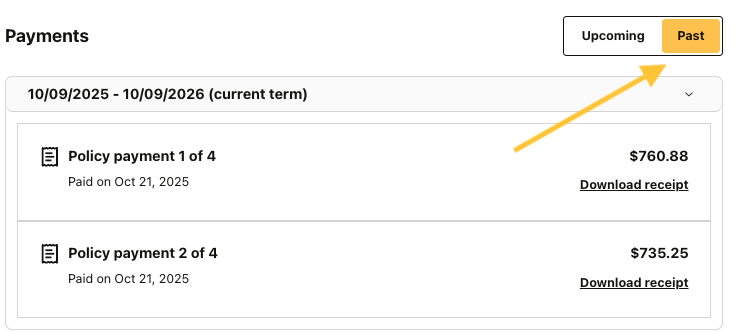
- You'll see a confirmation message if the payment succeeds. The transaction will then moved to the Past tab, where you can see all your payments made and download the receipt.
If payment fails, you will see an error message and will need to try again. The transaction will still show that payment is due in the Upcoming tab.